
Readapt: Accessible Reading for All
Overview
Readapt, developed by the Contentsquare Foundation, is a desktop software application designed to enhance reading accessibility for individuals facing challenges such as dyslexia, low vision, or difficulty concentrating. The software enables users to customize text on websites to match their personal reading preferences, making online content more comfortable and easier to process. It functions as a reading aid tool, directly modifying on-screen text elements to suit individual needs, thereby reducing visual strain and improving comprehension.
Target users include students, professionals, and general internet users who struggle with standard web text formatting. The application is especially beneficial for those seeking improved readability in educational, professional, or leisure reading environments. By offering customizable text parameters, Readapt supports inclusive digital experiences, aligning with broader accessibility standards. It is currently available in English and French, supporting users across multiple regions.
Readapt operates as a browser extension integrated with desktop environments on Windows, Mac, and Linux systems. The software does not require installation of additional plugins beyond the extension itself. The developer did not provide additional system requirements. No performance benchmarks were specified.
Key Features & Capabilities
- Customizable Fonts and Sizes – Users can adjust the font type and size to improve legibility, enabling a personalized reading experience tailored to visual comfort.
- Adjustable Spacing – Control spacing between letters, words, and lines to reduce crowding and enhance text separation, a known aid for dyslexic readers.
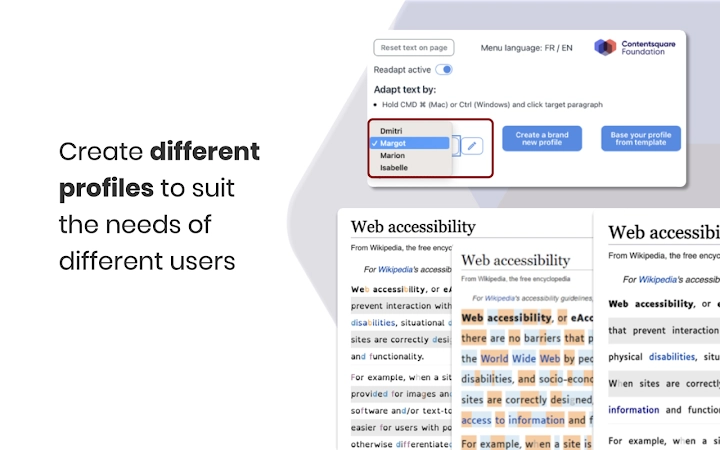
- Color-Coded Syllables and Phonemes – Highlight syllables with color and opacity to distinguish word structure and sound patterns, supporting phonetic decoding.
- Grapheme and Liaison Differentiation – Visually separate individual letters (graphemes) and, in French, distinguish liaison sounds to clarify pronunciation and word boundaries.
- Line and Silent Letter Highlighting – Emphasize entire lines of text and identify silent letters, helping maintain focus and improve reading accuracy.
- Reading Profile Templates – Start with pre-configured profiles or build a custom one from scratch, simplifying setup for new users.
These features are particularly useful in academic settings, remote work, and personal reading. For example, a student with dyslexia can use color-coded syllables to break down complex words, while a professional reading dense reports can adjust spacing to reduce visual fatigue. The tool’s adaptability ensures that users can tailor their experience to real-time reading needs across various websites and platforms.
User Interface, Workflow & Performance
Readapt features a clean, minimal interface designed for ease of use. The software integrates directly into the browser environment, with a simple toggle or icon-based control panel accessible from the toolbar. Navigation is intuitive, allowing users to adjust settings with minimal clicks. The workflow emphasizes quick access to customization options, enabling real-time modifications without disrupting reading flow.
Settings are grouped logically, with clear labels and visual feedback when changes are applied. The user can preview adjustments immediately, ensuring optimal configuration. The developer did not specify resource usage details. Performance observations are based on general software behavior patterns. No reported issues with stability or crashes were mentioned.
Given its lightweight footprint of 1.5 MB, Readapt is expected to have low impact on system performance. The application runs efficiently in the background without significant CPU or RAM consumption. Users can expect consistent responsiveness across multiple tabs and websites.
Compatibility & System Requirements
Readapt is compatible with Windows, Mac, and Linux operating systems, offering broad accessibility across desktop environments. The software version is 1.0.0, with an installation size of 1.5 MB. It functions as a browser extension, requiring no additional system-level installation beyond standard browser integration.
Exact system requirements were not listed. Compatibility information was partially provided. The developer did not specify minimum hardware specifications such as RAM or processor requirements. No information was shared about supported web browsers beyond general compatibility.
Pros and Cons
Pros
- Free to use with no hidden costs
- Designed specifically for users with reading challenges like dyslexia
- Offers extensive text customization options
- Available in both English and French
- Lightweight at just 1.5 MB
- Easy-to-use interface with quick access to settings
Cons
- No information on supported web browsers
- Exact performance metrics were not provided
- Only available as a browser extension, not a standalone desktop app
- Limited to two languages at launch
- No built-in update notifications
FAQ Section
Is Readapt available for all major browsers?
The software integrates as a browser extension, but the developer did not specify which browsers are supported.
Is Readapt safe to use?
As a free tool developed by the Contentsquare Foundation, Readapt does not require sensitive permissions. It operates within the browser environment without accessing personal data.
How often are updates released?
No information was provided about update frequency or release schedule.
Can I use Readapt offline?
Readapt functions as a browser extension and requires an active internet connection to modify web content.
Is the license type open or proprietary?
The software is free to use, but the developer did not specify the license type.
Final Thoughts
Readapt stands out as a thoughtful, accessible tool that empowers users with reading challenges to engage more confidently with online content. Its focus on customization, ease of use, and inclusivity makes it a valuable asset for students, professionals, and everyday readers. The absence of cost, combined with its lightweight design and multilingual support, enhances its appeal.
While some details like browser compatibility and update mechanisms remain unclear, the core functionality is strong and purpose-built. For individuals seeking a reliable reading aid that adapts text to personal needs, Readapt delivers meaningful benefits. The software represents a significant step toward inclusive digital reading experiences.
Download Readapt now







